Google Ads Script: Link Checker de luxe
The proven monitor for all final URLs in an improved version.
Free script version:
| Alert | Monitoring | Save costs | Keep clean | Adds Labels |
 |  |  |  |  |
For Extended Functionality 1/ SEA Suite user:
| Alert | Monitoring | Save costs | Keep clean | Changes in | Read-only (if desired) | Adds Labels |
| | | |  |  | |
Advantages of our Link Checker de luxe
Compared to Google Link Checker and other broken URL checkers, our Link Checker has many advantages:
- IMPORTANT: This link checker also checks whether tracking works
– even with the new tracking parameter. Other link checker scripts do not check tracking, but this is by far the most common error and often goes undetected for a long time because Google does not warn you if the tracking parameter is removed by incorrectly configured redirects– it simply stops tracking conversions. - Compatible with new assets and asset groups (Performance Max campaigns). This checks much more than just the classic sitelinks.
- On request, also checks the page content for configurable texts such as "not available," "no results," "out of stock," etc. – also with regular expressions for more complex checks.
- Detailed error report on redirect issues
- All parameters can be flexibly configured in a Google Sheet for hundreds of accounts in a MCC
- Request header can be extended so that restrictive firewalls can recognize our link checker as a valid bot.
- {ignore} in URLs are
taken into account – but not {ifmobile} etc.
Example alarm email
The alarm emails contain detailed descriptions of the problems detected with the respective URLs:
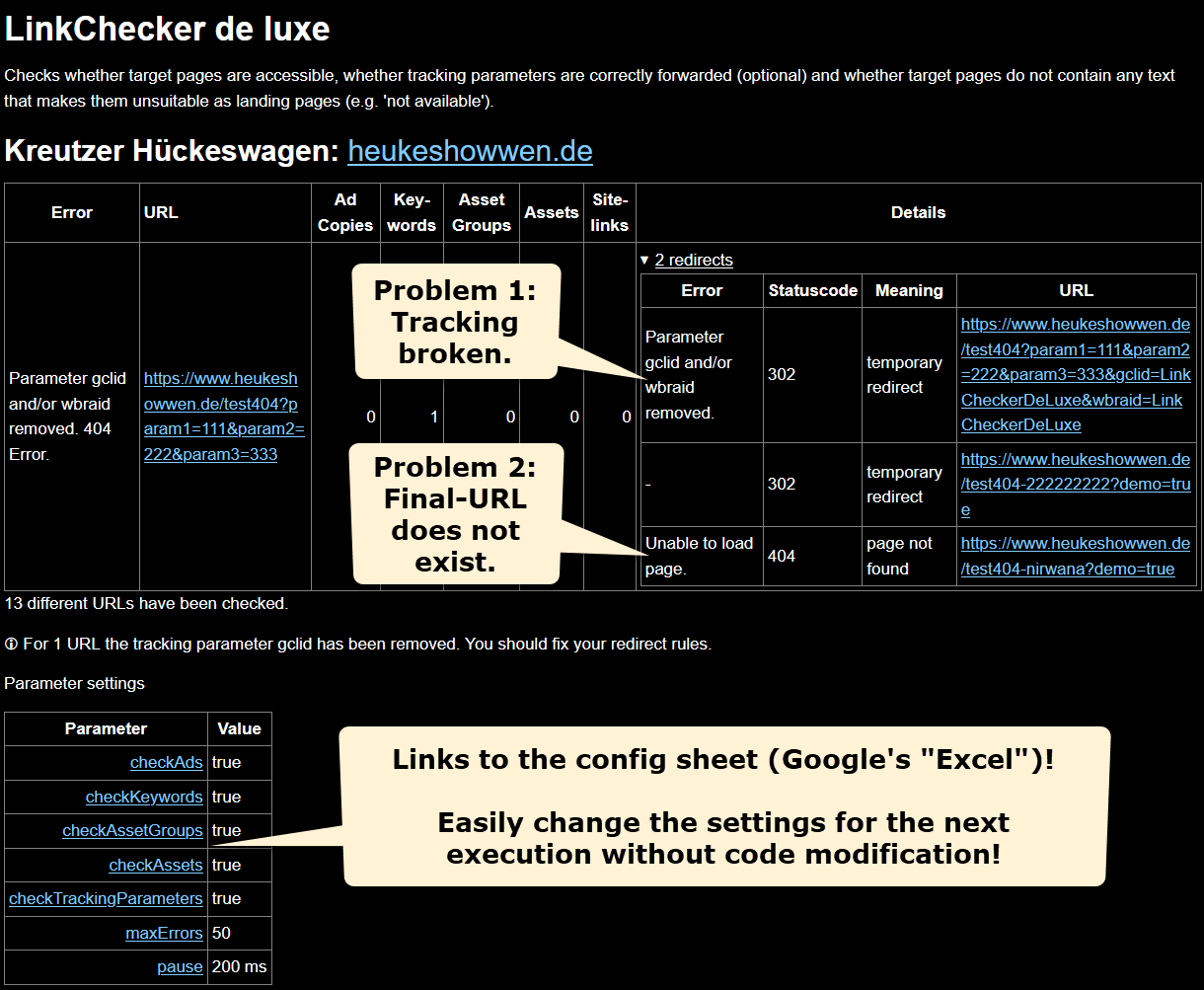
Configuration parameters
| Parameter | Description |
|---|---|
| reportFoundPhrases | Example configuration: Searches the HTML code on the landing page for text that should not appear. Note: If multiple spaces are used between words in the HTML code, multiple spaces must also be specified here. Regular expressions can even be used for special requirements, but the configuration is something for experts. This may be necessary if, for example, function() {return ["out of stock", /[^\d]0 products found/];} |
| removeParameter | Parameters that have no influence on the verification of the landing page (especially tracking parameters) should be listed here. This can drastically reduce the number of URLs checked! Example: |
| checkAds | Default value: TRUE Final URL and, if applicable, mobile final URLs are checked. |
| checkAssetGroups | Default value: TRUE Important for Performance Max campaigns. |
| checkAssets | Default value: TRUE Checks the URL of price extensions, for example |
| checkTrackingParameters | Default value: gclid Possible values: “none,” “gclid,” “wbraid,” “all together” Tip 1: Select “none” for accounts without tracking. Tip 2: Define two settings (configuration lines) if you also want to check whether the Google parameter “wbraid” is not being forwarded by the website. Define “gclid” in one line for checkTrackingParameters and “wbraid” in the other. When checking the landing page, the tracking parameters gclid and/or wbraid will be appended, which is required for Google Ads conversion tracking and Google Analytics. If Google tracking is used, you should test at least gclid. The most common source of errors are redirects that cut off parameters. This means that the links still work, but conversions are no longer tracked and Google Ads no longer appears as the source in Google Analytics. |
| pause | Default value: 200 Waits 200 ms between page views to avoid overloading the server. |
| maxErrors | Default value: 50 If 50 errors are found, no further errors are searched for to prevent the email from becoming too large. |
| urlFetchOptions | Example: Specially configured servers block too many requests from one IP address unless special HTTP headers are sent along with the request. However, this is only necessary in very few exceptional cases. |
| campaignNamesOrPattern | Default value: [empty = all campaigns] Either one or more campaigns with full names can be specified in [] or a pattern can be specified. Examples: 3 campaigns: ["Brand Search","Shopping Prio","PMax"] All campaigns containing ‘Brand’: *Brand* All campaigns that do not contain "Brand": !*Brand* |
| campaignLabelNames | Alternatively, campaigns can also be selected via labels. |
| hintsForSEO | If TRUE, you will also receive notifications if SEO problems are found. Only hints, no labels will be set and nothing will be paused. |
| pauseOnError | Default value: FALSE Automatically pauses rejected keywords and ads. |
| pauseOnErrorCodes | Default: 404, 410 Pauses only for HTTP Error Codes 404 (page does not exist) and 410 (page permanently removed) and if a phrase specified under reportFoundPhrases is found on the page. |
| reactivateIfErrorRemoved | Default value: TRUE Automatically reactivates rejected keywords and ads when no more errors are found. |
| campaignNamePattern | Older versions of the script used this parameter, but it had limited functionality compared to campaignNamesOrPattern. |
This script is free of charge. However, the red parameters are exclusive to users of the web application SEA Suite. Some advantages of
- Script results can be sent to
SEA Suite and/or by email. - Clear display and management of all script results and warnings for all accounts you manage.
- Also ideal for teams. Tasks can be marked as completed, for example.
- Extended functionality of some scripts exclusively for
SEA Suite users. - Additional scripts exclusively for
SEA Suite users.
Try SEA Suite free for one month!
Please log in so that you can view the non-public scripts and the extended functions available to you.Parameters that apply to all scripts
Download Google Ads script Link Checker de luxe
Please log in or register in the Ads Scripts Store first to download the script (why is this necessary?).